
Spring is one of the busiest seasons on the nonprofit events calendar, and for good reason. After a long winter, donors are ready to gather, celebrate, and give. A spring gala paired with a silent auction can be one of your most profitable fundraising events of the year, but the experience your guests have at the auction has a direct impact on how much you raise. A disorganized checkout or confusing bidding process can dampen the energy of an otherwise great evening. Get it right, and guests leave excited, with higher bids and a stronger connection to your mission.
This guide walks you through every stage of running a silent auction at your spring gala, from early planning through post-event follow-up.
Step 1: Set Your Goal and Timeline
Start by defining what success looks like beyond the dollar amount. Are you trying to engage new donors? Strengthen relationships with existing ones? Raise funds for a specific program? Your goal will shape decisions about item selection, pricing, and how you promote the auction.
From a timing standpoint, start earlier than you think you need to. Item procurement is the most time-intensive part of the process, and businesses and sponsors need lead time to approve donations. Here is a practical checklist to keep your team on track:
- 6–9 Months Out (Procurement Phase): Assemble your auction committee, build a wish list of items, and start reaching out to donors, sponsors, and local businesses.
- 3 Months Out (Cataloging): Set up your event in AuctionSnap, add item descriptions, and photograph donations as they come in.
- 2 Months Out (Follow-up): Conduct a final major push for items and follow up on any outstanding promises from donors or sponsors.
- 1 Month Out (Finalization): All items should be received, photographed, and entered in your auction system. Your online catalog should be activated and ready to share with guests.
Step 2: Build Your Item Procurement List
The quality and variety of your auction items will make or break your event. Aim for a mix of price points so every guest, regardless of budget, has something to bid on. Spring galas tend to attract donors who respond well to experience-based items, seasonal offerings, and local partnerships.
Strong categories for a spring gala auction include:
- Experiences: Cooking classes, private winery tours, spa packages, behind-the-scenes tours
- Travel: Weekend getaways, hotel stays, resort packages
- Seasonal: Garden party packages, outdoor dining experiences, spring home and garden items
- Local: Gift cards, business donations, community partnerships that resonate with your audience
As a general rule of thumb, aim for one auction item per every three to four guests. Too few items and competition drops; too many and items go unnoticed.
Learn more about Procuring Nonprofit Auction Items here.
Step 3: Set Up Your Auction Software
Your auction software is the backbone of the event, and setting it up early gives you the most flexibility. With a platform like AuctionSnap, you can configure your auction, add items with photos and descriptions, set bid increments, and receive a custom landing page and URL for your event, all from your desktop or mobile device.
Key things to configure early:
- Auction open times (for viewing)
- Bidding open and close times
- Starting bids and minimum bid increments for each item
- Auto-bid settings so guests can set a max bid and let the system do the work
- Buy It Now items for merchandise or fixed-price offerings
- Guest access settings: open public bidding vs. manual guest list
If you use DonorSnap as your CRM, you can import your guest list directly and link event attendees to existing contact records, saving significant time before and after the event. Explore how DonorSnap and AuctionSnap work together here.
Step 4: Open Bidding Early to Build Momentum
One of the most effective ways to increase your final auction totals is to open bidding before the night of the event. Sharing your auction link with guests in advance lets them browse items, build watchlists, and even place early bids before they walk through the door.
Early bidding creates anticipation and conversation leading up to the gala. When guests arrive already invested in an item or two, they are more engaged from the moment they sit down, and more likely to respond to outbid notifications throughout the evening. Even a 48-hour preview window can meaningfully impact your results.
Step 5: Promote the Auction to Your Guests
Do not wait until the night of the event to introduce guests to the auction. Send your custom auction link ahead of time through your event invitations, email communications, and social media. Give guests a sneak peek at a few standout items to build excitement.
In your pre-event communications, make sure guests know:
- How to register and set up their bidder account
- That they can add a credit card on file ahead of time for faster checkout
- When bidding opens and closes
- That they will receive outbid notifications so they never lose an item without knowing
Guests who are prepared before they arrive are far more likely to participate actively and bid higher.
Step 6: Run the Night-of Auction
A well-run gala auction feels effortless to guests, even though your team knows the work behind it. A few things that make a big difference on the night:
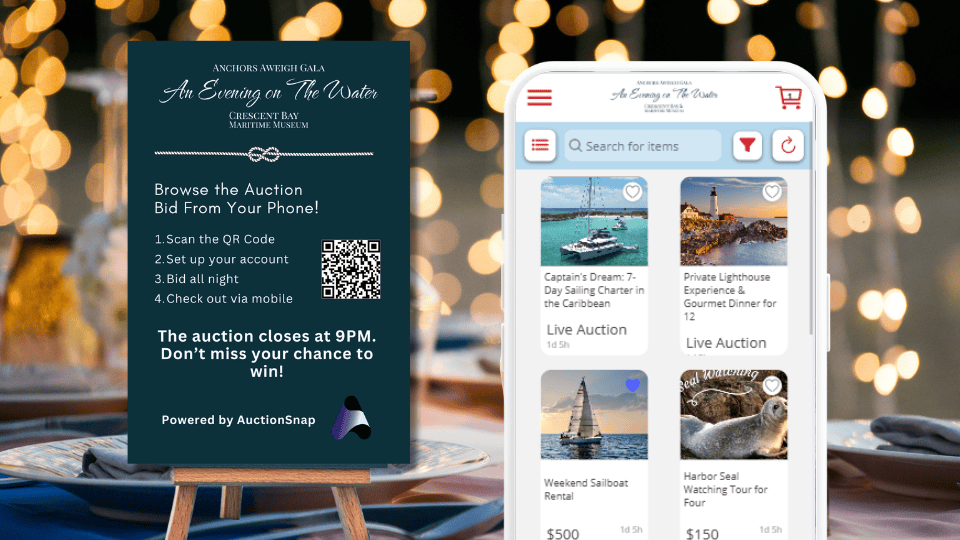
- Greet guests with the auction link and a QR code at check-in, and have a volunteer on hand to help anyone who needs a quick walkthrough of the mobile bidding platform
- Ask your emcee to announce the auction early and remind guests periodically throughout the evening, especially as closing time approaches
- Display table signage with QR codes so seated guests can easily pull up the auction between courses
- If you are running both silent and live auction items, AuctionSnap supports both in the same event, so your team manages everything in one place
Real-time bid visibility lets you monitor activity from the back end and spot items that may need a boost, whether through an emcee call-out or a well-timed announcement.
Step 7: Close the Auction and Handle Checkout
Checkout is the part of silent auctions that most often frustrates guests, and it does not have to. Mobile checkout lets winners pay directly from their phones the moment bidding closes, which eliminates lines and frees up your staff to focus on the guest experience.
A few checkout best practices:
- Optional: require payment method when they register, so checkout is instant
- Have your emcee announce bidding close 15 and 5 minutes before the deadline to spur last-minute bids
- Set up automated receipts so winners receive confirmation immediately by email
- Keep an admin checkout option available for guests who prefer in-person assistance
Step 8: Follow Up After the Event
The days immediately following your gala are a critical window for donor engagement. Guests are still energized from the event, and a thoughtful follow-up keeps that momentum going.
Start by pushing your transaction data to your CRM. If you use DonorSnap, AuctionSnap transfers all auction funds and donation data in just a few clicks, so you can send segmented thank-you communications without hours of manual data entry. Thank auction participants separately from general attendees, and include the auction results in your message so donors feel the impact of their participation.
For a more detailed look at keeping your audience engaged after the event, including sample thank-you letters, team debrief tips, and social media strategy, check out How to Maximize Post-Event Engagement.
Post-event follow-up is not just good manners; it is one of the highest-return activities in your fundraising calendar. Donors who feel thanked and informed are far more likely to attend your next event and give again.
Ready to Run Your Spring Gala Auction?
A well-run silent auction does not just raise money on the night of the event. It builds donor relationships, creates memorable experiences, and sets your organization up for stronger engagement throughout the year.
AuctionSnap was built to make the entire process, from item setup through post-event data transfer, as smooth as possible for nonprofits. Whether you are hosting your first gala auction or looking to streamline an annual event, schedule a free demo to see how it works.