It’s the night of your big fundraising event. Your guests are mingling, the energy is high, and the bidding has begun. But as the evening progresses, you notice certain auction items just aren’t getting the traction you hoped for. The bids are stagnant, the momentum is fading, and you’re starting to worry about whether you’ll hit your fundraising goals.
Don’t panic. Slow-moving auction items are a common challenge that nearly every nonprofit faces, but the good news is that with the right strategy and tools, you can turn things around, even mid-event. In this guide, we’ll walk you through proven strategies to get your auction items moving, with a special focus on how AuctionSnap’s powerful features can help you maximize your fundraising results.
Start By Procuring Auction Items Relevant to Your Guests
Before we dive into mid-auction rescue strategies, let’s address the foundation: securing the right items from the start.
If you want your auction items to move, you need to begin with items that resonate with your specific audience. While you can’t always predict what will or won’t generate excitement, over time you’ll develop a deeper understanding of your supporters’ preferences.
If this is your first auction or you don’t have historical data to reference, don’t worry. You can survey your supporters ahead of time to gauge their interests. Ask about their hobbies, favorite experiences, and price points they’re comfortable bidding on. You can also reach out to other similar organizations in your network and ask them which items consistently perform well at their auctions.
Preparing ahead of time ensures that on the night of your event, you have a well-balanced mix of items positioned to move. Think about including a variety of price points, experiences that appeal to different demographics, and unique items that can’t be found elsewhere.
Display Your Items Well
Even the most desirable auction items can underperform if they’re not presented effectively.
AuctionSnap makes it incredibly easy to showcase your auction items in their best light. With support for custom descriptions, intuitive filtering options, and multiple high-quality images, every item can be displayed professionally and attractively. When uploading photos, make sure you use good quality images with plenty of natural light. Blurry or dark photos will significantly reduce interest in even the most valuable items.
Tools like AuctionSnap also give you the ability to open your auction early and build momentum before the actual event. By giving guests access to browse items days or even weeks in advance, you create excitement, encourage early bidding, and give participants time to research and consider higher bids. This pre-event engagement often results in higher final bid amounts and more overall participation.
What to Do When Items Aren’t Moving During Your Auction
Now, let’s get to the heart of the matter. You’re in the middle of your event, and certain items just aren’t getting bids. Here’s your action plan, leveraging AuctionSnap’s features to turn things around in real time.
1. Send Targeted Broadcast Messages
Communication is key when auction momentum slows down. AuctionSnap’s broadcast messaging feature allows you to send in-app notifications to all participants currently browsing the event website.
Use this tool to:
- Announce that bidding is closing soon for specific items
- Highlight items that still need bids with compelling descriptions
- Create urgency by mentioning limited time remaining
- Share exciting updates like “Item #23 just received its first bid!”
For example, you might send a message like: “Only 15 minutes left to bid on the wine country getaway! Current bid is just $300—don’t miss this incredible opportunity!”
These real-time messages keep your guests engaged and can prompt action on items that have been overlooked.
2. Switch Items to “Buy It Now”
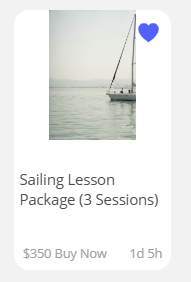
Sometimes guests are hesitant to bid because they don’t want to get into a bidding war or risk being outbid at the last minute. This is where AuctionSnap’s “Buy It Now” feature becomes invaluable.
For items that aren’t moving through traditional bidding, you can enable or adjust the “Buy It Now” price, allowing guests to purchase the item immediately at a set price. This is particularly effective for:
- Items with limited quantities that create fear of missing out
- Experiences that are time-sensitive or highly desirable
- Merchandise or packages that have a clear retail value
- Items where you’re confident the Buy It Now price still represents good fundraising value
The Buy It Now feature removes the uncertainty for bidders and can result in immediate purchases that might never have happened through traditional bidding alone.
3. Lower the Starting Bids
If you’ve set starting bids too high for certain items, you may be inadvertently discouraging participation. AuctionSnap gives you the flexibility to adjust starting bids even during the auction.
If an item has received zero bids after a reasonable amount of time, consider lowering the starting bid to make it more accessible. A lower entry point can:
- Encourage hesitant bidders to make that first bid
- Create competition once bidding has started
- Generate momentum that drives the final price higher than you might expect
Remember, some money is better than no money. An item that sells for $200 after you lowered the starting bid from $500 to $100 is still $200 more than you would have raised if it received no bids at all.
4. Leverage Manual Bid Entry for In-Person Excitement
For live, in-person events, don’t forget that AuctionSnap supports hybrid bidding models. If you have a charismatic auctioneer or emcee, they can call attention to items that aren’t moving and collect verbal bids from the crowd. These bids can then be quickly entered through AuctionSnap’s Manual Bid Entry page by your admin team.
This approach combines the excitement of traditional live auction dynamics with the convenience and tracking capabilities of modern auction software. Sometimes guests just need to hear the energy in the room and see others bidding to feel motivated to participate themselves.
5. Bundle Items Together
If individual items aren’t attracting attention, consider creating impromptu bundles. For example, if you have a restaurant gift certificate and a wine basket that are both underperforming, you could combine them into a “Perfect Date Night” package. While AuctionSnap requires some advance planning for optimal item setup, you can update descriptions in real-time to reflect new bundles and communicate these changes through broadcast messages.
6. Extend Your Auction Timeline
One of AuctionSnap’s most flexible features is the ability to customize bidding open and close times. If you’ve enabled the “Allow custom bidding open/close by location” feature in your Event Settings, you can extend the bidding window for specific items or entire categories.
This is particularly useful when you realize certain items need more time to generate interest. You can announce through a broadcast message that select items will remain open for bidding for an additional 30 minutes, giving guests who may have missed them earlier a second chance.
What to Do With Nonprofit Auction Items That Don’t Sell
Despite your best efforts, some items simply won’t sell during the event. But that doesn’t mean all is lost. AuctionSnap provides several options for maximizing the value of unsold items after your event concludes.
Continue the Auction Online
One of the many benefits of AuctionSnap is the ability to extend your auction beyond the physical event. Instead of packing up unsold items and considering the opportunity lost, you can keep the auction open online.
Here’s how to make this strategy work:
Send a follow-up email to all your supporters, including those who couldn’t attend the event, highlighting the success of the evening and then creating urgency with language like “Last Chance!” or “Extended Bidding: 48 Hours Only!” This approach accomplishes multiple goals:
- Engages supporters who wanted to participate but couldn’t attend in person
- Gives attendees who were outbid on their preferred items a chance to bid on alternatives
- Creates additional fundraising opportunities without additional overhead costs
- Maintains momentum and keeps your organization top-of-mind with supporters
Since AuctionSnap supports online-only auctions, guests can participate from anywhere, dramatically expanding your potential bidder pool. It is a simple way to raise some additional funds and extend the reach of your event.
Adjust Pricing and Repackage
For your extended online auction, don’t be afraid to adjust pricing on items that didn’t sell. Lower starting bids, add Buy It Now prices at more accessible price points, or rebundle items to create more appealing packages.
You can also update item descriptions with fresh, compelling copy that might resonate better than your original listing. Sometimes a simple reframe, from “spa package” to “stress relief escape for busy parents,” can make all the difference.
Use Items for Future Events
If certain items still don’t sell, don’t feel pressure to force them into the current event. If you have adequate storage space, set them aside for future fundraisers. These items may perform better in a different season, at a different type of event, or with a fresh marketing angle. Holding onto high-quality items can also help you get a head start on planning your next raffle, silent auction, or themed fundraiser.
Donate Them to Another Organization
If storing leftover items isn’t practical, donating them to another nonprofit or community group is a meaningful option. Local schools, shelters, or service clubs may be able to use them for their own events, and your contribution can strengthen relationships with organizations working toward shared community goals. This not only prevents waste—it also builds goodwill and reinforces your nonprofit’s presence as a collaborative, community-minded partner.
Frequently Asked Questions
Should You Return Items That Don’t Sell?
This is one of the most common questions nonprofits face, and the answer isn’t one-size-fits-all. The key is to establish a clear policy during your auction item procurement process so there are no surprises or awkward conversations after the event.
Create a Donation Policy Upfront
When soliciting auction items from donors, businesses, and sponsors, include a clear statement about what happens to unsold items. Your policy might include options such as:
- Items will be kept for future auctions (if the donor agrees)
- Items will be returned to the donor if they don’t sell
- Donors can choose to allow the organization to keep unsold items for other fundraising purposes
- Items may be featured in an extended online auction after the event
- Items can be donated to another organization
Document Donor Preferences
Make sure you track each donor’s preference in your system. AuctionSnap integrates with DonorSnap, making it easy to keep detailed records of donor information and preferences. When you receive a donated item, document:
- The donor’s contact information
- Their preference for unsold items (return, keep, or donate to the organization)
- Any expiration dates or time-sensitive details about the item
- Whether they’re open to having the item featured in future auctions
Communicate Transparently
Some donors specifically want their items returned if they don’t sell, especially if it’s a high-value item or something with personal significance. Others are happy to let your organization keep the item or dispose of it as you see fit. By asking upfront and documenting their wishes, you avoid uncomfortable situations and maintain positive donor relationships.
Best Practice Approach
Consider using a simple donation form or agreement that includes a checkbox section like this:
“If this item does not sell at the auction, please:
- [ ] Return the item to me
- [ ] Keep the item for a future fundraising event
- [ ] The organization may keep, donate, or dispose of the item at their discretion”
This simple step protects both your organization and your donors, ensuring everyone is on the same page from the beginning. Having this be part of a broader In-Kind donation acceptance policy ensures you handle every donation with tact and grace.
What If an Item Sells for Less Than Its Value?
Don’t panic. Remember that auction items are not retail transactions. Donors understand that auction prices can vary, and the primary goal is raising money for your cause, not achieving full retail value on every item.
That said, you can protect against significantly undervalued sales by:
- Setting appropriate starting bids (typically 30-50% of retail value)
- Using the Buy It Now feature at or near retail value for high-value items
- Creating urgency and competition through strategic marketing and broadcast messages
How Many Items Should We Have in Our Auction?
The ideal number varies based on your audience size, but a good rule of thumb is to have 50-75% as many items as you have attendees. For example, if you’re expecting 100 guests, aim for 50-75 auction items.
Too few items and you’ll have too much competition for each one, potentially pricing out smaller bidders. Too many items and you’ll dilute interest, making it harder for any single item to gain momentum.
AuctionSnap’s filtering and search features help manage larger auction catalogs, allowing guests to easily find items that interest them regardless of how many items you’re offering.
Can We Add Items During the Event?
Yes! AuctionSnap allows you to manage your auction in real-time. If a last-minute donation comes in or you realize you need to add something to generate more interest, you can add items during the event. Just make sure to announce new additions through broadcast messages so guests know to check for new opportunities.
What’s the Best Way to Handle Items That Never Get Any Bids?
If an item receives zero bids despite your efforts, you have several options:
- Feature it in your extended online auction with a lower starting bid and fresh marketing angle
- Offer it as a “bonus” or add-on to another item that’s performing well
- Save it for your next event, when it might appeal to a different audience
- Donate it to a raffle or door prize to still provide value to attendees
- Return it to the donor if that was the agreed-upon arrangement
- Use it as a thank-you gift for volunteers or major sponsors
The key is to have a plan in place rather than making emotional decisions in the moment.
Final Thoughts
Slow-moving auction items don’t have to spell disaster for your fundraising goals. With the right combination of strategic planning, compelling presentation, and powerful technology tools, you can maximize the value of every item in your auction.
AuctionSnap gives you the flexibility and control to adapt in real-time to your auction’s dynamics. From broadcast messages that create urgency, to Buy It Now options that eliminate bidding hesitation, to the ability to extend your auction online and reach supporters who couldn’t attend, these features transform how nonprofits can respond to fundraising challenges.
The key is to stay engaged, monitor your auction actively, and be willing to make adjustments as needed. Remember that every auction is a learning opportunity, and with AuctionSnap’s comprehensive tracking and reporting, you’re building valuable knowledge that will make each future event more successful than the last.
Ready to take your nonprofit auction to the next level? Learn more about how AuctionSnap can help you raise more money with less stress at auctionsnap.com.